Employees
This section is where you enter and manage all of your employees. To edit an employee, click the icon next to the employee’s name. To add a new employee, click the Add New Employee button in the lower right-hand corner.

The Employee Form

- Employee Details
Enter the employee’s name, address, and other general information. - Options
You can assign different employee types using the classification options.
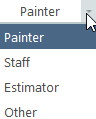
Employee Classifications
Non-Painters include all employee types that are not labeled as painters in the employee form.
- Non-painters are excluded from Workers Compensation, Holidays, and Sick Days.
- Their pay is divided among active painters working on jobs.
- This applies to office staff, estimators, and similar roles.
Example
If an employee works 2 hours per week for 50 weeks at $20/hour, the yearly cost is $2,000.
If you have two painters working 2,000 hours each per year, the $2,000 is divided between them:
$2,000 ÷ 2 painters ÷ 2,000 hours = $0.50 per hour
This amount is added to each painter’s overhead so the company earns the money required to cover the expense.
Taxes associated with this employee are handled the same way unless excluded by entering zero values in the tax fields.
Due to rounding to two decimal places, minor discrepancies may occur when dividing overhead costs.
Wages & Hours
Hourly Wage
Enter the base wage for the employee. When a raise is given, use
the raise button to record the increase and maintain wage history.
Hours Per Year
Enter the total hours the employee is expected to work annually.
This value is critical for calculating hourly overhead costs.
Overhead is divided among all active painters based on total projected hours.
Active
Only employees marked as active are included when overhead is calculated.
Exclude Workers Compensation
Typically used for owners who work on jobs but do not carry workers
compensation on themselves.
Payroll & Withholdings
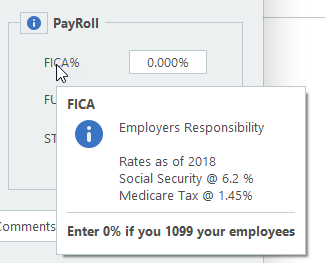
Hover over each payroll label in the program for detailed explanations. Consult your accountant or research employer responsibilities for your state.
If you have any questions, please contact support@thepaintestimator.com .