Hourly Wage
Starting with version 2.0.0.7, The Paint Estimator includes a method to adjust your company profit percentage using an hourly wage.
This allows you to price work based on what you want to charge per hour, per employee, instead of manually adjusting profit percentages.
How it works
Example: If you want to charge the customer $45.00 per hour per employee, enter $45.00 in the Hourly Wage field located below the employee selection on the Estimate tab.
Click Update, and the program will automatically adjust the company profit percentage to reflect that hourly rate.

You can also reverse the process by adjusting the company profit percentage. When you do this, the hourly wage value will update automatically.

Customer-specific hourly wages
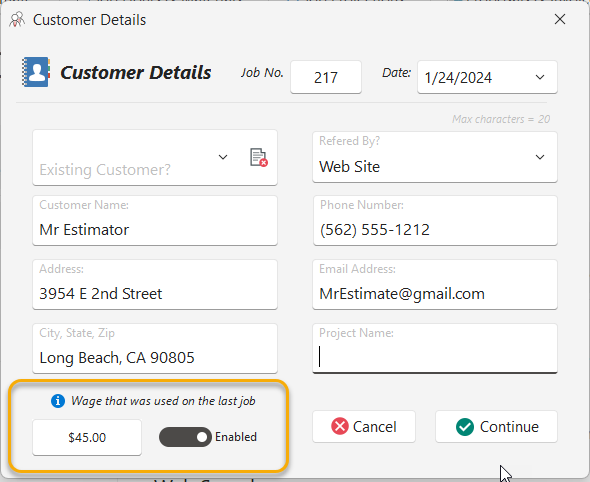
The Paint Estimator remembers the hourly wage used for each customer and address.
When you create a new estimate for an existing customer, you can choose to reuse the previous hourly wage or revert to your default company profit percentage.
For existing users, this feature applies only to new estimates created after version 2.0.0.7.
Benefits and considerations
- Easier to understand pricing by working in hourly terms
- Allows different rates for different customers
- Useful for long-term clients with custom pricing
- Be aware that rising labor, overhead, or workers’ compensation costs may reduce profit over time if hourly rates are not updated
Using hourly wage is completely optional. You can continue using the traditional company profit percentage if you prefer. When one value is changed, the other will always update automatically.
If you have any questions, please contact support@thepaintestimator.com .