Manually Install Your License
Read this section if you would like to manually install your license. This is typically done if you do not have an internet connection or if the web installer is not working correctly.
It is assumed that you have already activated your license and received an email containing your permanent license file.
Your permanent license will be attached to the email you received. If you need help downloading the license file from your email, see Browser Download Instructions.
If your program has already expired - then please jump to Here.
If the Program Has Not Expired
If your program has not expired, follow the steps below to manually install your license.
Start the program. When the main form appears, click the Registration button to view the registration information.

Another way to access the Registration page is to click the Help button at the top of the form and then select Registration.

On the Registration page, click the Manual Install License button.

A file browser will open, typically pointing to your Downloads folder. Locate the file named license.license, select it, and click OK.
The program will restart. If all went well, your license will now be active.
If the Program Has Already Expired
If the program has already expired, follow the steps below to manually install your license.
Start the program. When the registration form appears, click the I Received My Permanent License Email button.
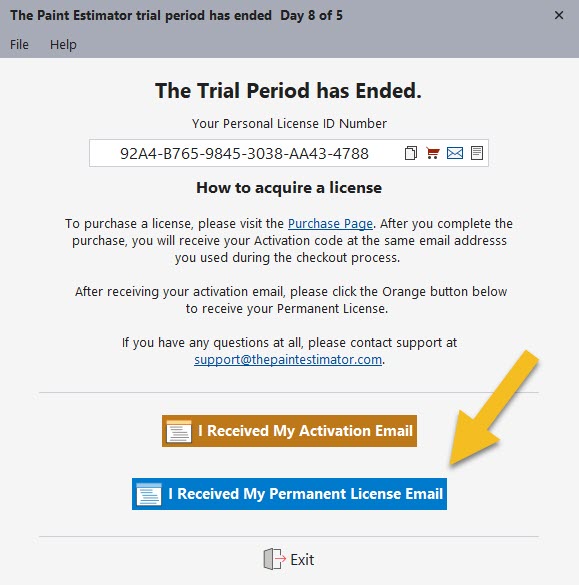
This will bring you to the manual installation screen.

A file browser will open, typically pointing to your Downloads folder. Select the license.license file and click OK.
The program will restart and your license should now be fully installed.
Alternative Method: Manual File Copy
As an alternative, you can manually copy the license file into the program directory.
Download the license.license file, right-click the file, and select Copy.
Right-click the The Paint Estimator desktop shortcut and choose Open file location.

Paste the license file into the program folder. Restart the program to complete the installation.
If you have any questions, please contact support@thepaintestimator.com .