Using the Item Cost Option
New in version 2.0.0.8
The Item Cost option allows you to estimate areas or items using a fixed price per unit instead of production rates. This method is especially useful for specialty work such as kitchen cabinets.
Conceptually, this option sits between Production Rates and Free Entry, combining fixed pricing with structured grouping.
Opening the Item Cost form
Start by opening an estimate, then click the Item Cost button on the Estimate tab.

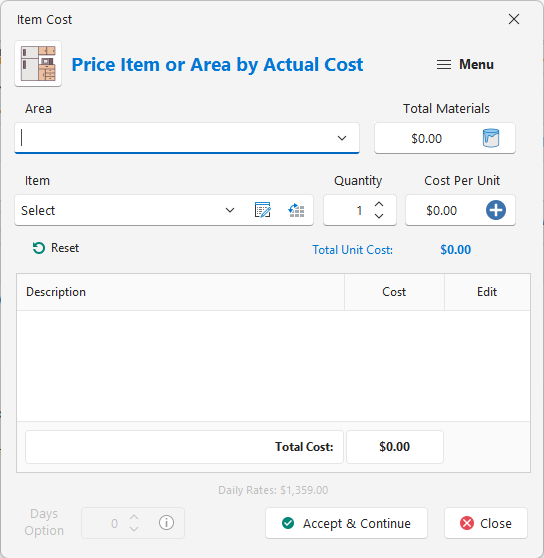
Adding items
- Enter the area name for the group.
- Select or enter the materials for the entire group.
- Select an item from the dropdown or switch to manual entry.
- Enter the quantity.
- Enter the price per unit.
- Click Add to include the item in the group.

Managing price items
Click the Price button to open the price list editor, where you can add, edit, or delete items shown in the dropdown.


Applying items to the estimate
Once all items are added, click Accept & Continue. The entire group will be imported into your estimate.


To edit the group later, right-click the group header and select Edit. This reloads the group back into the Item Cost form.

If you need to adjust materials directly in the estimate, edit the last materials line in the group. Only that line is recognized when the group is reopened.
The Days Option
The Days Option is intended for niche, specialty work where you know how many days a job should take, regardless of calculated production.
This is commonly used for cabinet refinishing, where higher skill, specialty materials, and equipment justify a higher hourly rate.
Example
- 60 cabinet doors @ $125.00 each
- 10 drawer faces @ $75.00 each
- 8 boxes @ $200.00 each

With an hourly wage of $50.00/hr, the estimate calculates approximately 8.2 days to complete.

Enable the Days Option from the menu and enter the number of days you believe the job should take.

Example: If you enter 5 days, the program recalculates the hourly wage to approximately $82.02/hr, assuming a three-person crew.

The Days Option should only be used when the Item Cost group is the only scope in the estimate. Using it with other line items can dramatically inflate profit and material markup.
This option is intentionally tucked away due to its power and potential to create confusing results if misused.
If you have any questions, please contact support@thepaintestimator.com .