Getting Started
Here are the basic steps to get set up and start your first estimate.
The first thing you will want to do is open the Company Data form and go through the six main sections. These areas include Company Info, Employees, Workers Compensation, Working Hours, Overhead, and Profit settings.
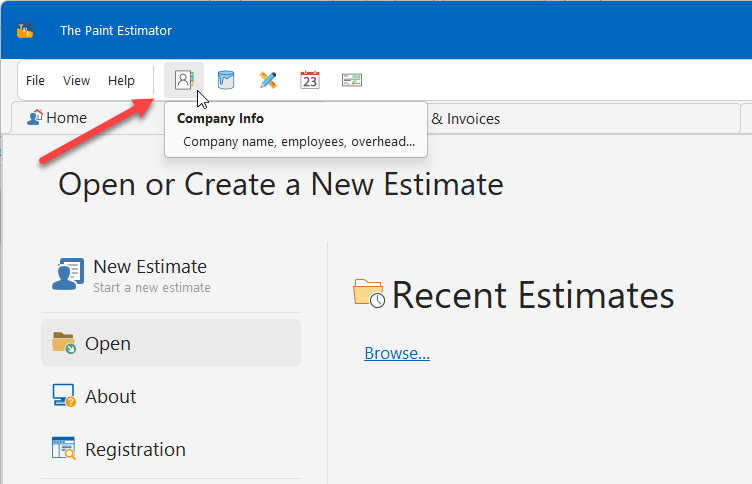
Open Company Data
To open the Company Data form, click on the icon indicated in the image below.
Step 1: Company Information
Fill out your company name, address, and other basic business details.

Step 2: Employees
This section is where you add your employees. You will see a default employee named The Boss. This represents you as the owner of the company.
Edit this employee and enter your own information, including your wage. Be sure to use a wage that reflects what you would pay someone else with the same skill set.

After editing your information, click Save & Return and continue adding additional employees.
Important: You must always have at least one employee classified as a painter. Painters generate income that pays for overhead and operating expenses.

Step 3: Workers Compensation
If you carry workers compensation insurance, enter the appropriate values here. The calculation method can vary by state.
In many states, including California, Option A is commonly used.

Step 4: Working Hours & Employee Perks
Enter how many hours your employees work per day, along with sick time and holiday benefits. These perks apply only to painters.

When finished, click Save All. The program will calculate how much these perks add to each employee’s hourly rate.
Step 5: General Overhead
Overhead includes all expenses required to operate your business, such as licenses, insurance, vehicles, phone costs, and office supplies.
Enter each overhead item carefully, as these costs are distributed across your active painter employees.


Step 6: Profit & Summary
Enter your default company profit percentage. The default is 15%, but this value can be changed later on individual estimates.
The summary section shows a breakdown of your total overhead.

Review Employee Costs
After completing these steps, return to the Employees page to review how overhead and workers compensation are distributed.
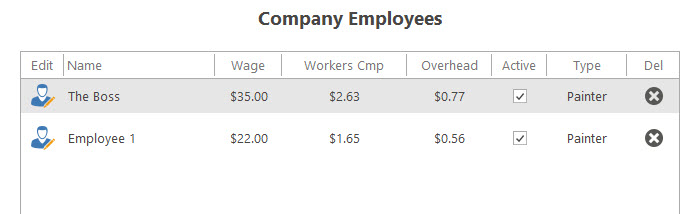
This calculation ensures that overhead is properly accounted for across all active painters.
If at any time you have questions, please contact support@thepaintestimator.com .