The Production Rates Form

Editing production rates
To edit an existing rate, right-click anywhere on the row header and select Edit, or click directly into a cell and change the value.
The Rate column is not editable, as it is calculated automatically based on the Units per Hour.
Organizing rates
You can reorder rates by clicking and dragging the row header up or down within the same group.
To move a rate to a different group, drag it into the destination group’s row header.
Adding a new rate
Click the New Rate button at the top of the form. A dropdown panel will appear.
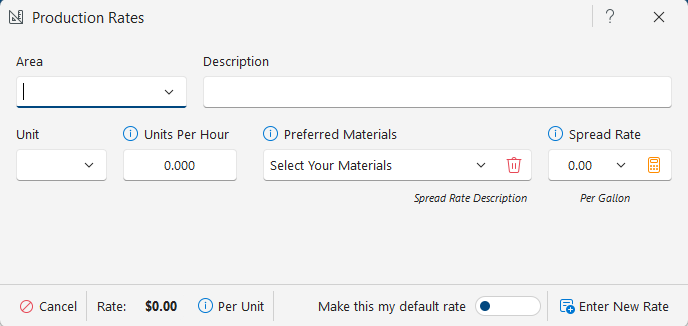
Enter or select the area, add a description, choose the unit, and enter how many units can be completed in one hour. Then select preferred materials and enter the spread rate.
Below Units per Hour, you can mark the rate as the Default Rate. When a default rate is set, it is automatically selected when you choose the associated area during estimating.

Spread rate guidelines
For units measured in Sq. Ft or Sqm, enter the typical coverage per gallon or liter. Most paints cover about 400 Sq. Ft per gallon or 9–12 Sqm per liter.
If the task does not use paint (for example, sanding), enter 0 for the spread rate.
Spread rate calculator
When the unit is Each or Linear, you can use the built-in spread rate calculator located next to the spread rate field.

Example: If a fascia board is 1 linear foot long and 12 inches wide, that equals 1 square foot. With a coverage of 400 Sq. Ft per gallon, one gallon covers 400 linear feet.
If the width were 6 inches, one linear foot equals 0.5 Sq. Ft, allowing 800 linear feet per gallon.
When finished, click Update & Close. You can also open the calculator by clicking directly in the Spread Rate cell.

Live rates and summaries
To preview how a rate behaves during an actual estimate, right-click the rate and select Live Rates.

To view a rate summary, click the Sum button in the rate box.
Gallons and liters are always rounded up to the nearest whole unit. Partial gallons or liters cannot be purchased.
If you have any questions, please contact support@thepaintestimator.com .